
Release Notes Summary - 2026.1
New Features and Enhancements:
-
AC-14625 – Connecting/Triangular Flight Functionality
Added additional support for connecting and triangular flight operations, improving handling of passengers traveling across multi-segment itineraries within a single operational flow. -
AC-16324 – Special Characters Allowed in Terminal Name Field
Enhanced the terminal configuration settings to allow special characters in terminal name fields. -
AC-16196 – Ability to Print Windows Boarding Passes and Bag Tags in PCM
Enabled printing of Windows-based boarding passes and bag tags directly from Peripheral Control Manager for improved compatibility with supported printers. -
AC-16538 – Ability to Disable Webhooks for Flight Segments
Added configuration controls allowing administrators to disable webhooks at the flight segment level.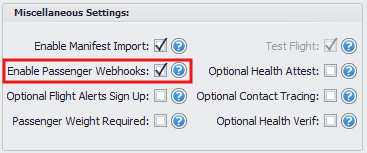
-
AC-16407 – User Permission to View Public or Private Flights
Introduced role-based permissions that control whether users can view public flights, private flights, or both.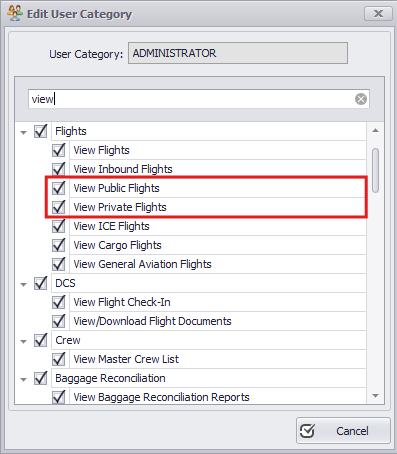
-
AC-16539 – AeroCloud Certification
Completed New AeroCloud certification, ensuring compliance and integration standards are met for airport system interoperability. -
AC-15949 – Delete / Undelete Passenger Security Permission
Enhanced security controls by separating delete and undelete passenger permissions into distinct user privileges.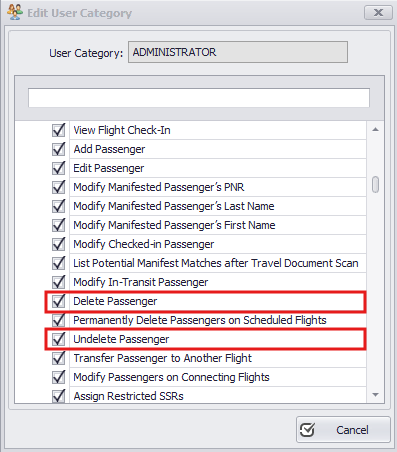
-
AC-14898 – Make Timatic Check a Boarding Requirement
Added the option to enforce a successful Timatic document check as a mandatory requirement before boarding. -
AC-16618 – PCM Gate Pass Windows Printing
Enabled Windows-based printing for gate passes within Peripheral Control Manager to align with boarding pass print workflows. -
AC-16147 – Ability to View Passenger Information on Deleted Passengers
Improved data visibility by allowing authorized users to access passenger information even after deletion. -
AC-3010 – Ability to Require Reason for Reprint Request / Report of Reprinted Boarding Passes and Bag Tags
Added functionality to require users to provide a reason when reprinting boarding passes or bag tags, with reporting capabilities for audit tracking. -
AC-16733 – Boarding Date Modified to Date/Time Field
Updated the boarding date field to include both date and time for improved accuracy and operational tracking. -
AC-16808 – Limited Release Print Recorded in Database
Enhanced system logging to record limited release print actions within the database for auditing purposes. -
AC-14882 – Boarding Pass Access After Check-In Window Closes
Adjusted Online Check In rules to allow appropriate access to boarding passes even after the official check-in window has closed. -
AC-16885 – Save Grid Layout for Specific User Groups
Added the ability to save customized grid layouts at the user group level for consistent interface configuration. -
AC-16807 – Show Printed and Active Bag Count
Enhanced baggage tracking visibility by displaying both printed and currently active bag counts. -
AC-16864 – Additional Workflow Automation Times
Expanded workflow automation settings to support additional configurable timing options. -
AC-16824 – UK Border Force APIS Integration
Implemented integration with UK Border Force APIS requirements to ensure compliance with UK passenger data submission regulations.
[Bug Fixes]
-
AC-16876 – Indian Passport Issue w/ Missing Last Name Fixed
Resolved an issue affecting Indian passport processing when the last name field was missing or formatted differently.